A production-style REST API for a blogging platform built with Go, Gin, and PostgreSQL.
The project implements a secure authentication system using JWT access tokens, refresh tokens, and ownership protection for blog posts.
It also includes:
- 🐳 Docker setup
- 📚 Swagger documentation
- 🔐 Secure authentication
- 📄 Pagination and filtering
- 🧱 Clean modular architecture
This project was built as a backend portfolio project demonstrating how a real-world API can be structured and implemented.
- User registration
- User login
- JWT access tokens
- Refresh token flow
- Logout functionality
/users/meendpoint to retrieve the current authenticated user
- Password hashing using bcrypt
- JWT authentication middleware
- Protected routes
- Ownership validation (only the author can edit/delete their posts)
- Create post
- Update post
- Delete post
- Get all posts
- Get post by ID
- Search posts by text
- Pagination support (
limit/offset)
- PostgreSQL database
- Docker Compose environment
- Environment variables configuration
- Swagger (OpenAPI) documentation
- Clean modular project architecture
| Technology | Purpose |
|---|---|
| Go | Backend language |
| Gin | HTTP framework |
| PostgreSQL | Database |
| pgxpool | PostgreSQL driver |
| JWT | Authentication |
| bcrypt | Password hashing |
| Docker | Containerization |
| Swagger (OpenAPI) | API documentation |
SecureBlog-API
│
├── auth/                 # JWT logic and password hashing
│   ├── password.go
│   └── token.go
│
├── docs/                 # Swagger documentation (generated)
│
├── handlers/             # HTTP handlers
│   ├── auth.go
│   ├── posts.go
│   ├── middleware.go
│   ├── me.go
│   └── ping.go
│
├── models/               # Data models
│   ├── post.go
│   └── user.go
│
├── router/               # Router configuration
│   └── router.go
│
├── postgres_data/        # PostgreSQL volume
│
├── Dockerfile
├── docker-compose.yml
├── .env
├── go.mod
├── main.go
└── README.md
Start the API and PostgreSQL database:
docker compose up --buildAPI will be available at:
http://localhost:8080
Swagger documentation:
http://localhost:8080/swagger/index.html
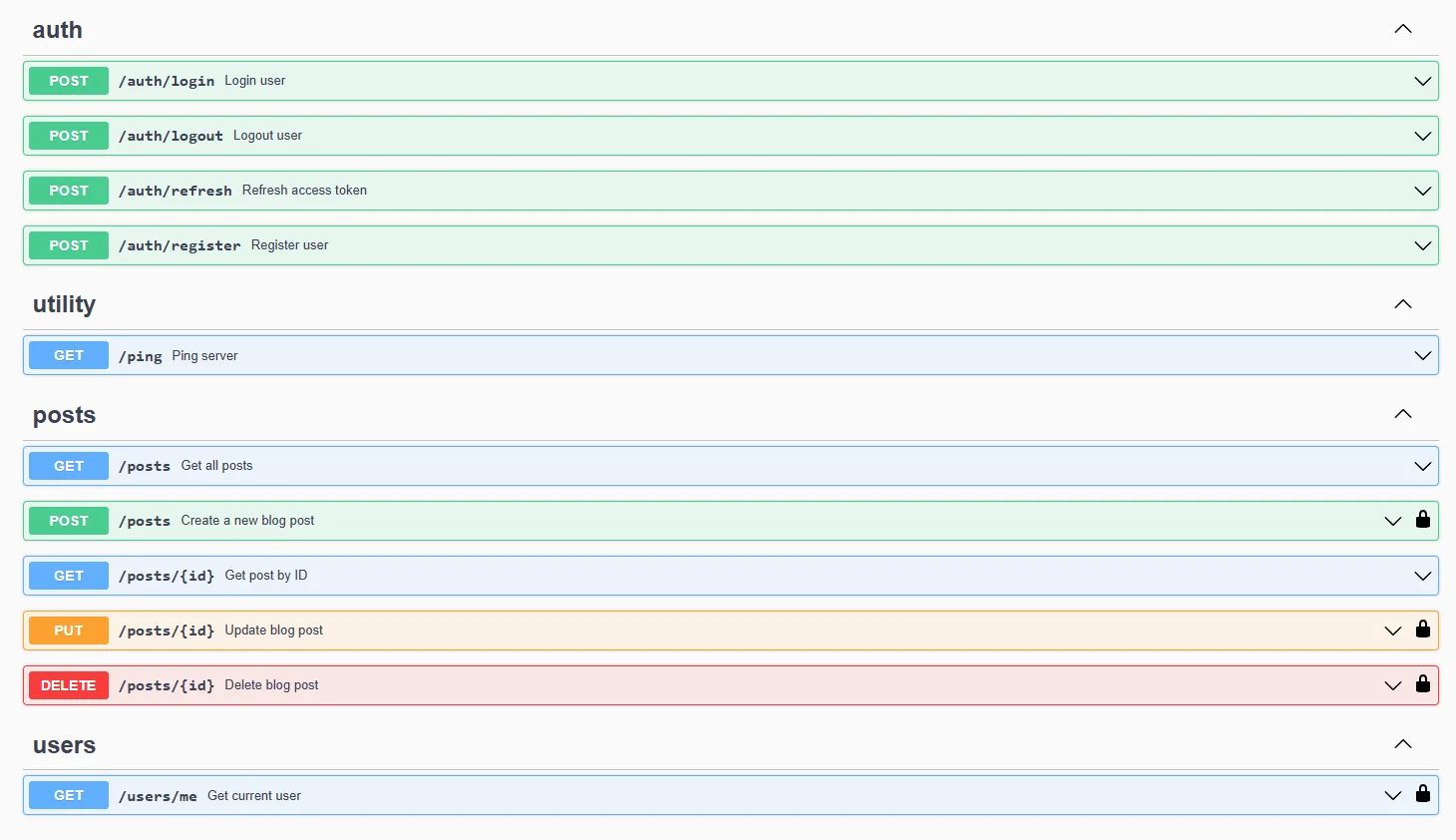
Install dependencies:
go mod tidyRun the server:
go run main.goCreate a .env file in the project root.
Example:
PG_USER=bloguser
PG_PASSWORD=admin
PG_DB=blogdb

JWT_SECRET=super_secret_jwt_key

APP_PORT=8080

DB_URL=postgres://bloguser:admin@localhost:5432/blogdb?sslmode=disable
| Method | Endpoint | Description |
|---|---|---|
| GET | /ping |
Check server status |
| POST | /auth/register |
Register a new user |
| POST | /auth/login |
Login user |
| GET | /auth/refresh |
Refresh access token |
Require header:
Authorization: Bearer <access_token>
| Method | Endpoint | Description |
|---|---|---|
| GET | /users/me |
Get current user |
| POST | /auth/logout |
Logout user |
| POST | /posts |
Create post |
| GET | /posts |
Get all posts |
| GET | /posts/:id |
Get post by ID |
| PUT | /posts/:id |
Update post |
| DELETE | /posts/:id |
Delete post |
The posts endpoint supports pagination.
Example:
GET /posts?limit=10&offset=0
Parameters:
| Parameter | Description |
|---|---|
| limit | number of posts returned |
| offset | number of skipped posts |
Example:
GET /posts?term=golang&limit=5&offset=10
POST /auth/login
Response:
{
  "access_token": "JWT_TOKEN"
}Requests must include:
Authorization: Bearer <token>
GET /auth/refresh
Generates a new access token.
POST /auth/logout
Removes refresh token.
users
| Column | Description |
|---|---|
| id | user id |
| username | username |
| user email | |
| password_hash | hashed password |
| created_at | account creation date |
posts
| Column | Description |
|---|---|
| id | post id |
| author_id | post author |
| title | post title |
| content | post content |
| category | post category |
| tags | tags |
| created_at | created time |
| updated_at | last update time |
- bcrypt password hashing
- JWT authentication
- token expiration
- refresh token flow
- ownership validation
- protected routes middleware
Interactive API documentation:
http://localhost:8080/swagger/index.html
Swagger allows you to:
- view all endpoints
- inspect request schemas
- test API directly in browser
- authenticate using JWT
POST /auth/register
POST /auth/login
POST /posts
GET /posts
This project demonstrates how to build a secure REST API backend with:
- authentication
- database integration
- middleware
- pagination
- Docker infrastructure
- API documentation
It can serve as:
- 💼 a backend portfolio project
- 🚀 a starting point for a blogging platform
- 📚 a learning project for Go backend development
Possible extensions:
- 💬 comments system
- ❤️ likes system
- 👥 role-based access control
- 🔍 full-text search
- 🚦 rate limiting
- 📦 database migrations
- ⚙ CI/CD pipeline
- ⚡ Redis caching
MIT License